using System;
using System.Collections.Generic;
using System.Linq;
using System.Text;
using System.Threading.Tasks;
using System.Xml;

namespace hello_world
{
    class Program
    {
        static void Main(string[] args)
        {
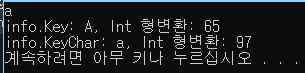
            ConsoleKeyInfo info = Console.ReadKey();
            Console.WriteLine("\ninfo.Key: {0}, Int 형변환: {1}", info.Key, (int)info.Key); //enum형식
            Console.WriteLine("info.KeyChar: {0}, Int 형변환: {1}", info.KeyChar, Convert.ToInt32(info.KeyChar)); //char형식
        }
    }
}
using System;
using System.Collections.Generic;
using System.Linq;
using System.Text;
using System.Threading.Tasks;
using System.Xml;

namespace hello_world
{
    class Program
    {
        static void Main(string[] args)
        {
            //한줄 입력받기: 엔터를 누르면 문자열 값이 만들어짐
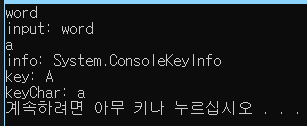
            string input = Console.ReadLine();
            Console.WriteLine("input: {0}", input);

            //문자 입력받기: 키를 누르면 키정보 값이 만들어짐
            ConsoleKeyInfo info = Console.ReadKey();
            Console.WriteLine("\ninfo: {0}", info);

            //Key: 열거형식 (ConsoleKey)값
            ConsoleKey key = info.Key;
            Console.WriteLine("key: {0}", key);

            //KeyChar: 문자형식 값
            char key_char = info.KeyChar;
            Console.WriteLine("keyChar: {0}", key_char);
        }
    }
}