using UnityEngine;

public class Singleton
{
    private static Singleton instance;

    private Singleton() { }

    public static Singleton Instance
    {
        get
        {
            if (instance == null)
            {
                Debug.Log("싱글톤 생성");
                instance = new Singleton();
            }
            return instance;
        }
    }

    public void Load()
    {
        Debug.Log("Load");
    }
}
MonoBehaviour를 지워 컴퍼넌트에 추가x
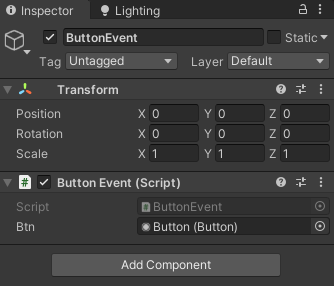
using UnityEngine;
using UnityEngine.UI;

public class ButtonEvent : MonoBehaviour
{
    public Button btn;

    void Start()
    {
        btn.onClick.AddListener(() =>
        {
            Singleton.Instance.Load();
        });
    }
}

'Unity > 수업 내용' 카테고리의 다른 글
| [Unity 2020.3] UGUI Slider, (0) | 2021.10.27 |
|---|---|
| [Unity 2020.3] JSON .NET For Unity, json 불러와서 사용하기 (0) | 2021.10.26 |
| [Unity 2020.3] LoadSceneAsync 비동기 씬 전환, 데이터 전달 (0) | 2021.10.25 |
| [Unity 2020.3] 10-21 MiniRPG 경험치 UI, 이펙트 (0) | 2021.10.21 |
| [Unity 2020.3] 10-20 MiniRPG 공격, 피격 이펙트 ,체력바, 플레이어 사망 (0) | 2021.10.20 |